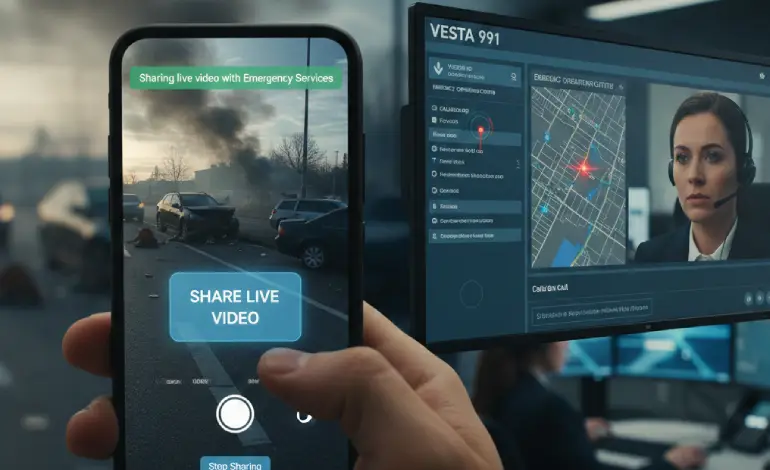
In an emergency, every second counts, and the inability to clearly describe a rapidly unfolding situation can be a critical roadblock. Google has launched a powerful new feature for Android devices called Emergency Live Video, fundamentally changing how users communicate with emergency services. This feature allows dispatchers to receive a secure, real-time video stream from the caller’s phone, giving them eyes on the scene to rapidly assess the crisis and coordinate the best possible response.
Here are the full details on how this game-changing feature works, who can use it, and why it is a major step forward for public safety.
1. What is Emergency Live Video? (A Dispatcher’s Visual Lifeline)
Emergency Live Video is an innovative capability integrated directly into the Android operating system. Its purpose is to provide emergency call handlers (e.g., 911 in the U.S., 112 in Europe, or similar local equivalents) with crucial visual context that a verbal description alone cannot convey.
Whether dealing with a complex car accident, guiding a layperson through CPR, assessing a rapidly moving wildfire, or navigating a medical crisis, a live video feed allows responders to:
-
Quickly Assess the Severity: Determine the scope of the incident instantly.
-
Dispatch the Right Resources: Ensure the correct type and number of units (police, fire, EMS) are sent immediately.
-
Offer Real-Time Guidance: Walk the caller through life-saving actions, such as applying pressure to a wound or performing chest compressions, with visual confirmation.
2. How the Feature Works: A Secure, Consent-Based Process
Google designed the Emergency Live Video feature to be simple, secure, and entirely user-controlled, requiring no complex setup or pre-configuration from the user.
The Step-by-Step Process:
| Step | Action | Description |
| 1. The Emergency Call | User initiates a call or text to the local emergency number. | This process is triggered during an active emergency communication. |
| 2. Dispatcher Request | The call handler (dispatcher) determines if visual context is necessary. | If they decide seeing the scene would be helpful, they send a live video request to the caller’s Android device. |
| 3. User Prompt | The Android user receives a clear, full-screen prompt. | The prompt asks if the user wishes to “Share live video?” with options like “Share” or “No thanks.” |
| 4. User Consent | The user must tap “Share” to begin the stream. | The video feed only starts if the user explicitly consents, placing control entirely in their hands. |
| 5. Live Streaming | A secure, encrypted stream begins transmitting from the phone’s camera. | The live feed integrates directly into the dispatcher’s command center software (such as Motorola Solutions’ VESTA 911 system). |
3. Security and Control: The Non-Negotiable Elements
Google built this feature with privacy and control as core pillars, recognizing the sensitive nature of emergency situations:
-
Explicit Consent is Mandatory: The stream can never be initiated remotely or automatically by the dispatcher or the system. The user must always tap the consent button.
-
Instant Control to Stop: Users can stop the video stream instantly at any time by tapping a prominent “Stop sharing” button without interrupting the audio portion of the emergency call.
-
End-to-End Encryption: The live video is encrypted by default to ensure the privacy of the visual information being shared.
-
No Pre-Setup Required: The feature is available immediately on compatible devices and requires no prior user enrollment, ensuring it’s ready when a crisis hits.
4. Who Can Use It and Where It’s Available
Emergency Live Video is built for maximum accessibility across the Android ecosystem, but its availability is also dependent on local public safety infrastructure.
| Component | Detail |
| Device Requirement | Any Android phone running Android 8 (Oreo) or higher with current Google Play services support. This covers a vast majority of devices still in active use. |
| Geographic Availability | The feature is rolling out initially in the U.S., as well as select regions of Germany and Mexico. |
| Expansion | Google is continuously working with Public Safety Answering Points (PSAPs) and public safety organizations worldwide to integrate the capability into more regions. |
5. Technical Integration: Powered by Android ELS
The functionality of Emergency Live Video is seamlessly integrated with existing emergency technology on Android, specifically the Emergency Location Service (ELS).
ELS is Android’s supplemental emergency location service that uses the Android Fused Location Provider (FLP) to calculate a more accurate, on-device location using signals from GPS, cell towers, Wi-Fi, and other sensors. This ensures that when the dispatcher receives the video feed, they are simultaneously receiving the most precise and timely location data available, often faster and more accurately than traditional 911 infrastructure alone.
By combining the live visual context with superior location accuracy, Google is aiming to provide emergency services with the most complete picture possible, proving that in a crisis, sometimes seeing is truly believing.